Selection List from a Database
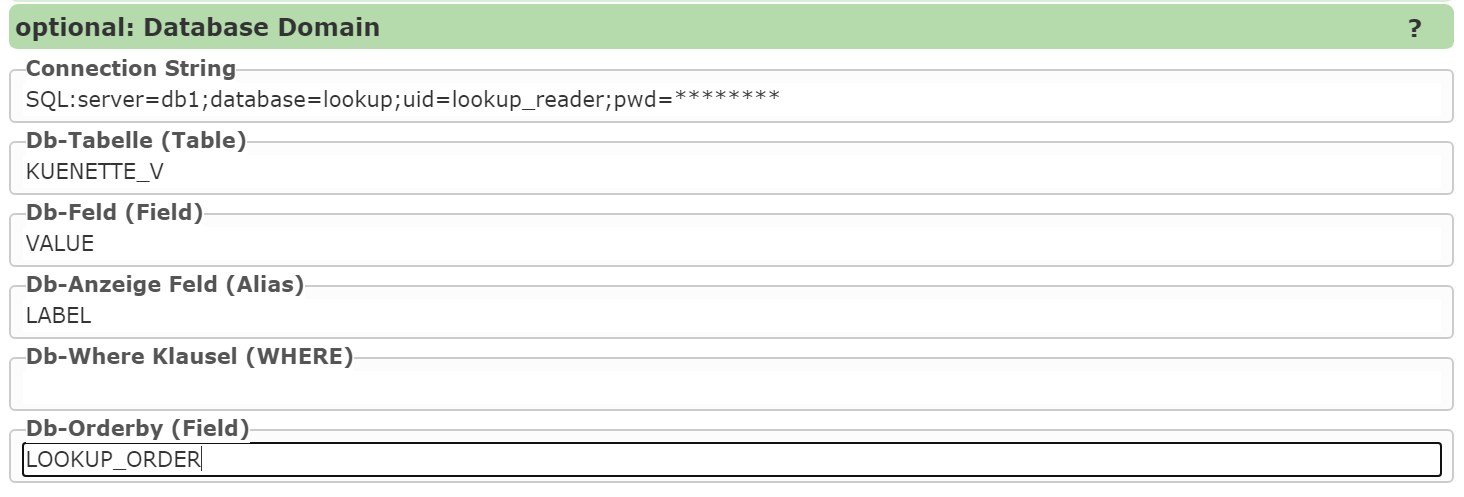
To create a selection list from a database, a connection string to the database must first be defined.
The prefix SQL: indicates that this is an SQL Server database.
The following parameters are then set:
Table (or view): The data source from which the values for the selection list come.
Db field: The column that contains the value of a list entry. - When a selection is made, this value is stored in the geodatabase.
Db display field: The column that shows the user the display name (label). - This column can be identical to Db field. - If the stored values are not descriptive, an alternative, more understandable column can be specified here.
Additionally, the following optional settings can be made: ✅ Where condition: Restricting the values via an SQL filter. ✅ Sort column: Defining the sort order of the values.
Dynamic Dependencies Between Selection Lists
Normally, selection lists are filled by the map viewer when the input form is created. However, there are use cases where the content is only defined later – for example, when a list is dependent on another selection list.
Example: - Only once the user makes a selection in list A should list B be filtered accordingly.
To enable such dependencies, placeholders can be used in the where condition:

In this example, SYSTEM is an input field with a selection list.
If the selection there changes, the dependent selection list is also automatically updated.
The dependency arises from the placeholder:
WHERE ... = '{{SYSTEM}}'
Further Placeholder Options
Additionally, role parameters can also be used to further restrict lists. An example of this is:
{{role-parameter:gemnr,GEM_NR like '{0}'}}
Here, a user’s role parameter “gemnr” would be used to dynamically filter the selection list. The possibilities offered by role parameters are explained in more detail in the whitepaper “Extended Role Parameters”.