Calling DataLinq and Examples
Query results are available either as raw data (SELECT) or in a formatted form (REPORT). The call consists of the following parts:
URL to DataLinq
Call type (Select, Report)
Name (Id) of the endpoint
Name of the desired query
(optional): name of the view
(optional): specification of the request parameters
DataLinq-URL / Call type / Endpoint @Query (@View) (?Parameter1=Value1(&Parameter2=..)
E.g.
http://localhost/api5/datalinq/report/ssg-sdet@proj-geb@proj-gebbestand?GebaeudeId=E313049&Bezeichnung=Text123
Calling Raw Data (SELECT)
To call the raw data of a query result, select “SELECT” as the call type and omit specifying the view. The data is returned as JSON.
http://localhost/api5/datalinq/select/ssg-sdet@proj-geb?GebaeudeId=E313049
[
{
    "ID": "E313049",
    "PLTXT": "GLASERWEG"
}
]
Calling Formatted Data (REPORT)
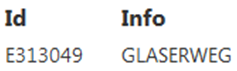
If one or more views exist for a query, they can be called to display the data in a formatted form:
http://localhost/api5/datalinq/report/ssg-sdet@proj-geb?GebaeudeId=E313049
<table>
    <tr>
        <th>Id</th>
        <th>Info</th>
    </tr>

    @foreach(var record in Model.Records) {
        <tr>
            <td>record["TP"]</td>
            <td>record["PLTXT10"]</td>
        </tr>
    }
</table>